How to report a GCash or Maya scam
Sent money to a scammer or saw an unauthorized wallet transaction? Here is what to do first, what evidence to save, and where to report GCash or Maya scams.
GCash and Maya scams move fast. The safest response is not panic, public shaming, or paying a recovery fixer. Start with official wallet support, preserve evidence, and escalate through the right channel if needed.
- If you sent money through GCash or Maya
- First, identify what kind of wallet problem this is
- Evidence to prepare for GCash or Maya support
- How to report a GCash scam
- How to report a Maya scam
- When to escalate beyond GCash or Maya
- What not to do after a GCash or Maya scam
- How TsekMuna helps before and after wallet payments
- Copy-and-paste wallet scam report template
If you sent money through GCash or Maya
Move fast, but do not move blindly. A scam through GCash or Maya can be a tricked payment, an unauthorized transaction, a phishing/account takeover, a fake seller, or a wrong-recipient issue. The first job is to stop the bleeding: do not send another peso, secure your account, and report through the official app or hotline.
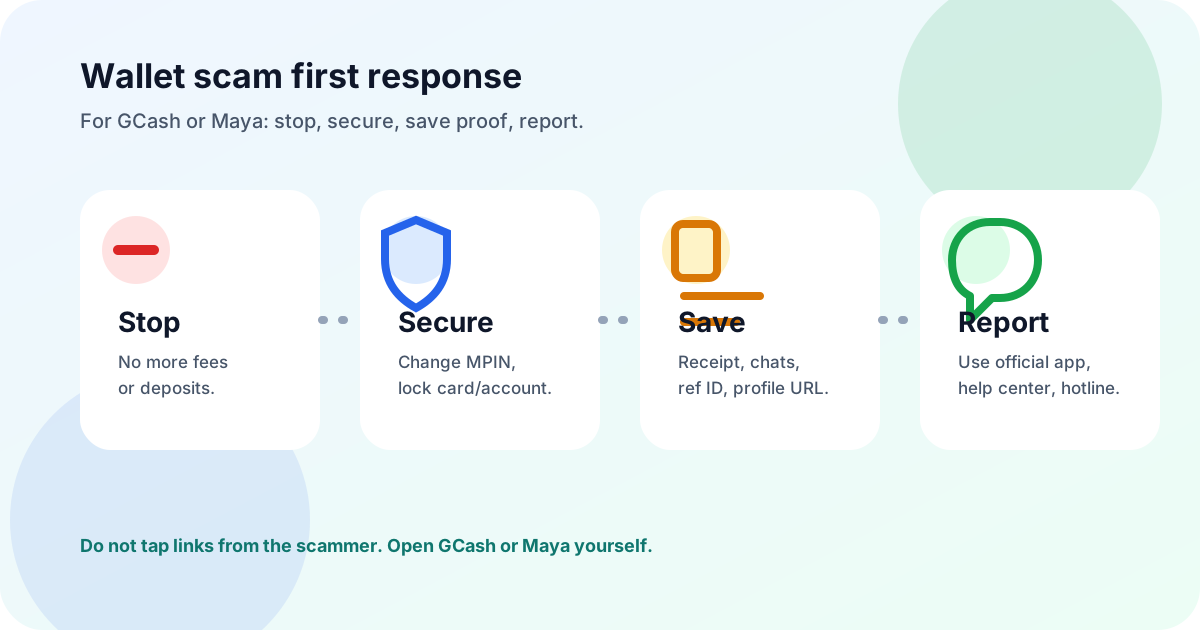
- 1Do not send any "refund fee," "unlock fee," "tax," "verification fee," or "last payment." That is usually the same scam continuing.
- 2Open the official GCash or Maya app yourself. Do not tap links from SMS, Messenger, email, or random comments.
- 3If you shared an MPIN, password, OTP, card details, or clicked a suspicious login page, change credentials from a trusted device immediately.
- 4Screenshot the chat, transaction receipt, recipient name or number, reference ID, profile URL, and listing before blocking the scammer.
- 5Report to GCash or Maya immediately, then file official reports if the loss is significant, repeated, or involves identity theft, threats, or account takeover.
For wallet scams, minutes matter. Report to the wallet provider before posting publicly, because account review or freezing is time-sensitive.
First, identify what kind of wallet problem this is
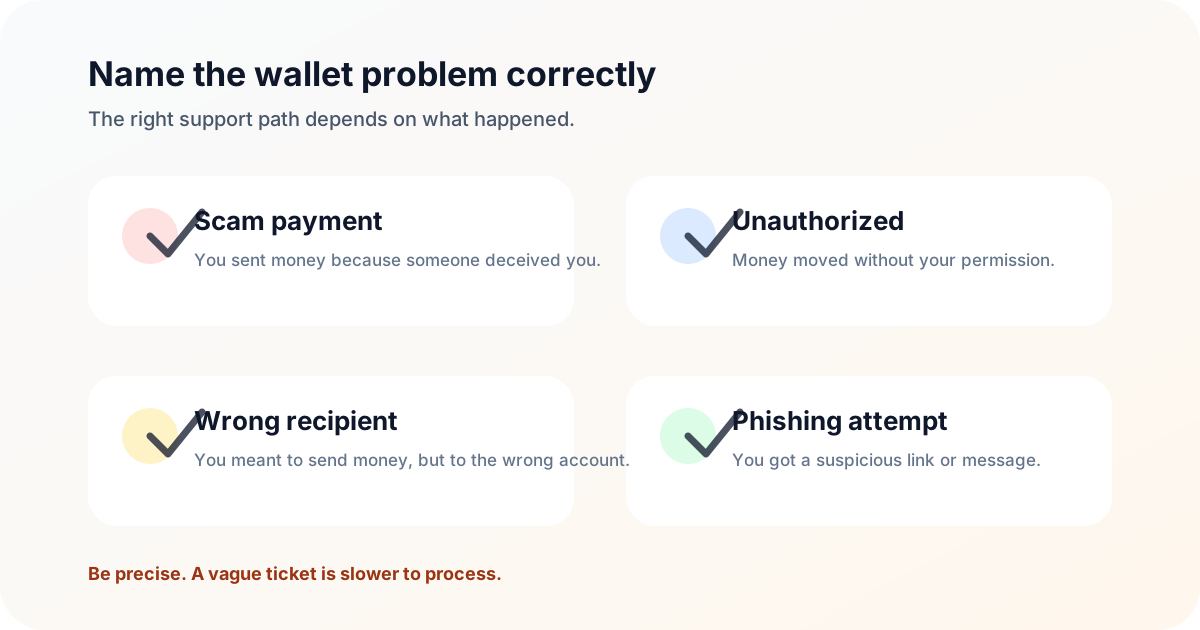
The words "na-scam ako" can mean different things to a wallet support team. Choose the right lane so your ticket does not get misrouted.
- Do not label a wrong-recipient transfer as a scam unless there was actual deception
- Do not file a bad-faith or malicious report; stick to what your evidence shows
- Do not assume a wallet provider can return funds once the money has been withdrawn or moved
- Scam payment: you willingly sent money because someone deceived you. Example: fake seller, fake job fee, romance emergency, fake investment, or impersonated support.
- Unauthorized transaction: money moved without your permission. Example: account takeover, stolen credentials, linked payment, card charge, or suspicious app access.
- Wrong recipient: you meant to send money, but entered the wrong number or account. This is not always treated like a scam, so use the provider-specific route.
- Phishing attempt only: you received a suspicious link or message but did not pay or enter details. Report the message and do not interact with it.
Evidence to prepare for GCash or Maya support
Wallet support teams need the exact transaction and the surrounding context. The best report is short, factual, and backed by screenshots.
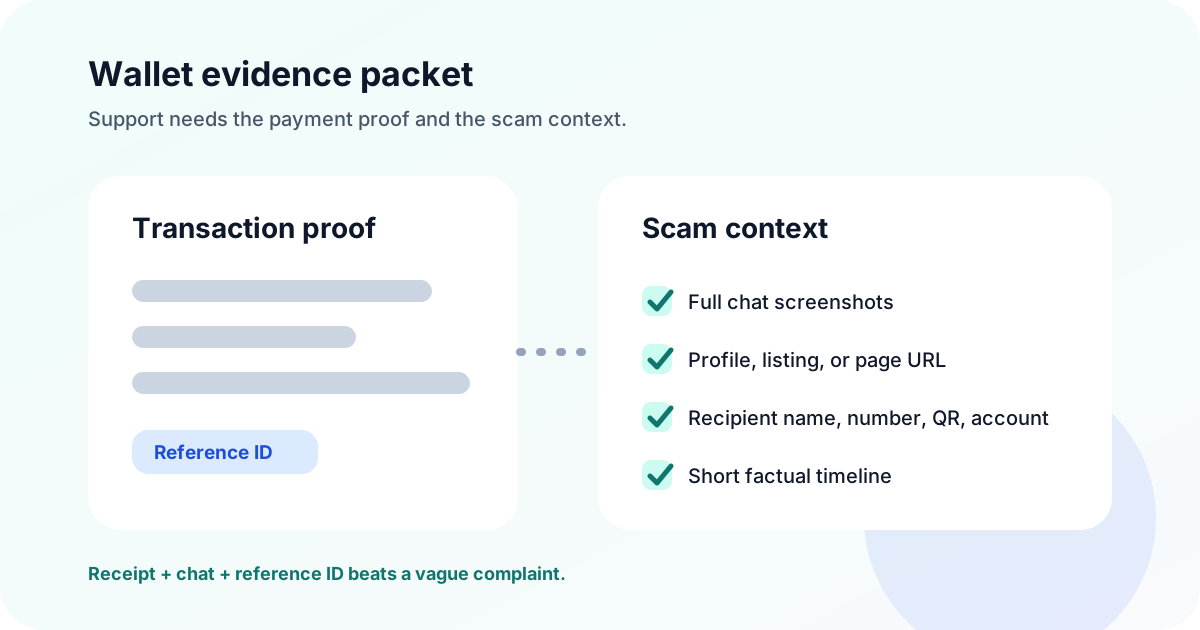
- Transaction receipt screenshot with amount, date, time, reference ID, recipient name, and masked number or account detail
- Full chat screenshots showing the offer, pressure, payment instruction, promise, and what happened after payment
- Profile, page, group, listing, website, or ad URL connected to the scam
- Phone number, username, QR code, email, or wallet/account name used by the scammer
- A one-paragraph timeline: first contact, payment time, how you realized it was a scam, and whether more money was requested
Keep unedited originals. For public posts or TsekMuna reports, redact OTPs, IDs, full card details, addresses, and private third-party information.
How to report a GCash scam
GCash has a specific Help Center article for scam transactions where someone tricks you into sending money. GCash says to report the scammer to authorities, prepare details and screenshots, report to GCash immediately, and block the scammer. For transactions you did not make, use the unauthorized transaction route in the GCash app through Get Help and Gigi where available.
- 1Open the GCash app or help.gcash.com directly; do not use support links sent by the scammer.
- 2Choose the right issue type: scam transaction, unauthorized transaction, wrong recipient, card issue, or account access issue.
- 3Attach screenshots and transaction details, then save the support ticket number.
- 4If you reported an unauthorized transaction, monitor ticket updates in Help > My Support Tickets or your registered email.
- 5For serious fraud, also file with PNP ACG, NBI Cybercrime Division, or CICC/1326 and include your GCash ticket number.
- GCash Help Center: Report a scamUse for scam transactions where someone deceived you into sending money through GCash.
- GCash Help Center: Report unauthorized transactionsUse when transactions appear in your GCash account that you did not make.
- GCash Help Center: Protect your accountGCash safety guidance, including reminders that GCash will not ask for MPIN or OTP.
- GCash Help Center: Request transaction historyUse if you need transaction records to support your report.
How to report a Maya scam
Maya directs users to the in-app Help Center for account and transaction concerns. Maya also lists hotlines for urgent account concerns, including suspected unauthorized transactions. For suspicious Maya-related messages, Maya advises users not to click links and to verify directly through the Maya app, official website, or official support.
- 1Open Maya directly, go to Profile, then Get help. Use Chat with us, Raise a ticket, or Chat with an agent when available.
- 2For urgent unauthorized transactions or lost/stolen phone concerns, use Maya hotlines listed on the official contact page.
- 3Prepare screenshots, receipts, confirmation messages, reference IDs, prior support messages, and any scam chat evidence.
- 4If a card is involved, use in-app card controls where available and report the suspicious charge quickly.
- 5Keep the ticket or reference number, especially if you need to escalate later to BSP or law enforcement.
- Maya: Contact Us and Help CenterUse the Maya app Help Center, ticket/chat flow, or hotline for urgent account and transaction concerns.
- Maya: What to do with suspicious bank messagesMaya safety guidance on avoiding links, verifying directly, and reporting suspicious messages.
- Maya: Never click suspicious linksMaya guidance on phishing links and safer verification through official channels.
- Maya Terms: Transaction concerns and disputesMaya terms covering transaction concerns, written reports, hotlines, and dispute handling.
When to escalate beyond GCash or Maya
GCash or Maya can review wallet activity, but they are not the only reporting route. Escalation depends on what happened: unresolved financial complaints may go to BSP, cybercrime may go to PNP ACG or NBI, text scams may go to NTC, and privacy misuse may go to NPC.
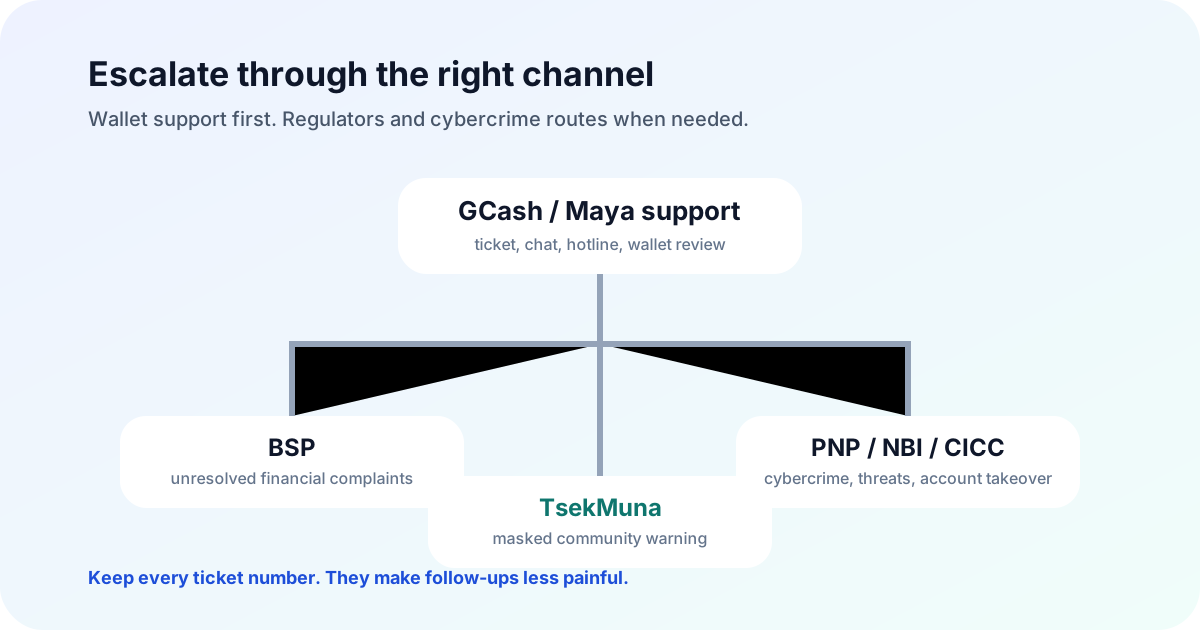
- Escalate to BSP if your wallet/bank complaint is unresolved after you first report to the institution
- Escalate to PNP ACG, NBI, or CICC/1326 when there is cybercrime, account takeover, phishing, identity theft, threats, or larger losses
- Report text scams to NTC and preserve the SMS sender, message body, and timestamp
- Report personal-data misuse, leaked IDs, doxxing, or malicious disclosure to the National Privacy Commission when privacy rights are involved
- BSP Consumer Assistance MechanismEscalation route for concerns involving BSP-supervised financial institutions after first contacting the provider.
- BSP verifier and report guidanceBSP page with financial scam reporting guidance and supervised institution verification.
- PNP Anti-Cybercrime GroupReport cybercrime, phishing, account takeover, extortion, or repeated online fraud.
- NBI Cybercrime Division complaint assistanceNBI route for investigative assistance to victims of computer crimes.
What not to do after a GCash or Maya scam
The hours after a scam are emotional. That is exactly when people accidentally lose more money, leak private data, or weaken their own report.
- Do not pay a recovery agent, hacker, fixer, or "wallet insider" who promises to reverse the transfer
- Do not share your OTP, MPIN, password, card number, CVV, selfie verification, or SIM details with anyone
- Do not install remote-access apps because a caller says they are from GCash, Maya, your bank, or law enforcement
- Do not post full receipts with reference IDs, full names, phone numbers, addresses, IDs, or private photos
- Do not threaten or harass a suspected scammer; keep your report factual and evidence-based
- Block further contact after saving evidence
- Use official app, website, or hotline only
- Write down the exact support ticket numbers
- Post only masked, factual warnings if you need to warn others
- Submit a TsekMuna community report so others can search the number, name, or pattern before paying
How TsekMuna helps before and after wallet payments
Before payment, TsekMuna helps you pause and check a GCash/Maya number, QR, seller name, link, or screenshot before you send. After a scam, TsekMuna helps turn your experience into a masked community warning so the next person can search before paying.
TsekMuna is not GCash, Maya, BSP, police, or a refund service. It cannot reverse a transfer or make a legal finding. Use official routes for account action and investigation, then use TsekMuna as the community-warning layer.
If you are still unsure about a seller or wallet number, run a free scam check. If you already lost money, read the broader Philippines scam reporting guide and browse community reports for similar patterns.
- Before sending: check the wallet number, QR, seller, link, or screenshot
- After sending: preserve evidence, file official reports, then add a masked TsekMuna report
- When writing a public warning: use facts, not threats; mask sensitive data
Copy-and-paste wallet scam report template
Use this as the starting point for a support ticket, platform report, or official complaint. Replace bracketed parts with your details and attach evidence.
Subject: Wallet scam report - [GCash/Maya] - [transaction date]
I am reporting a suspected scam involving my [GCash/Maya] account. On [date/time], I sent [amount] to [recipient name/number/account detail] with reference ID [reference]. I sent the money because [seller/profile/page/person] claimed [short description of item, service, job, investment, emergency, or support issue].
After payment, [what happened: blocked me, did not deliver, asked for another fee, sent a fake receipt, took over my account, etc.]. Attached are the transaction receipt, screenshots of the conversation, profile/listing URLs, recipient details, and a short timeline. Please investigate, advise if funds/account action is possible, and provide a ticket or reference number.
Keep the tone calm. Support teams and investigators can act faster when the report is specific, factual, and complete.
Frequently asked questions
How do I report a GCash scam?
Use the official GCash Help Center or the GCash app. Choose the right route for scam transactions, unauthorized transactions, wrong-recipient transfers, or account access issues. Attach screenshots, transaction receipts, reference IDs, recipient details, and a short timeline. For serious fraud, also report to authorities such as PNP ACG, NBI Cybercrime Division, or CICC/1326.
How do I report a Maya scam?
Open the Maya app, go to Profile, then Get help. Use the Help Center, ticket/chat flow, or official hotline listed on Maya’s contact page for urgent concerns such as suspected unauthorized transactions. Prepare screenshots, receipts, confirmation messages, reference IDs, and scam chat evidence.
Can GCash or Maya return money sent to a scammer?
Recovery is not guaranteed. Wallet providers can review, investigate, and sometimes take account action, but funds may be difficult to recover once withdrawn or moved. Report quickly, keep your ticket numbers, and escalate through official channels when appropriate.
What is the difference between a scam and an unauthorized transaction?
A scam payment usually means you sent money because someone deceived you. An unauthorized transaction means money moved without your permission, often from account takeover, stolen credentials, linked payments, or card misuse. They may require different support paths.
Should I post the GCash or Maya number publicly?
Warn others carefully. Mask sensitive data, keep it factual, and avoid threats or harassment. Do not post OTPs, MPINs, passwords, full card numbers, full IDs, addresses, or private third-party information. Keep unredacted evidence for official reports.
Is a TsekMuna report enough after a wallet scam?
No. A TsekMuna report is a community warning, not an official wallet, police, regulator, or refund report. File with GCash or Maya first for account action, then use TsekMuna to help warn others.